
ncSenderPro
The Pro licence for ncSender — the control software for grblHAL machines. One payment adds 4th axis, laser mode, multi-workspace and touchscreen kiosk support to the app you already run.
What you get
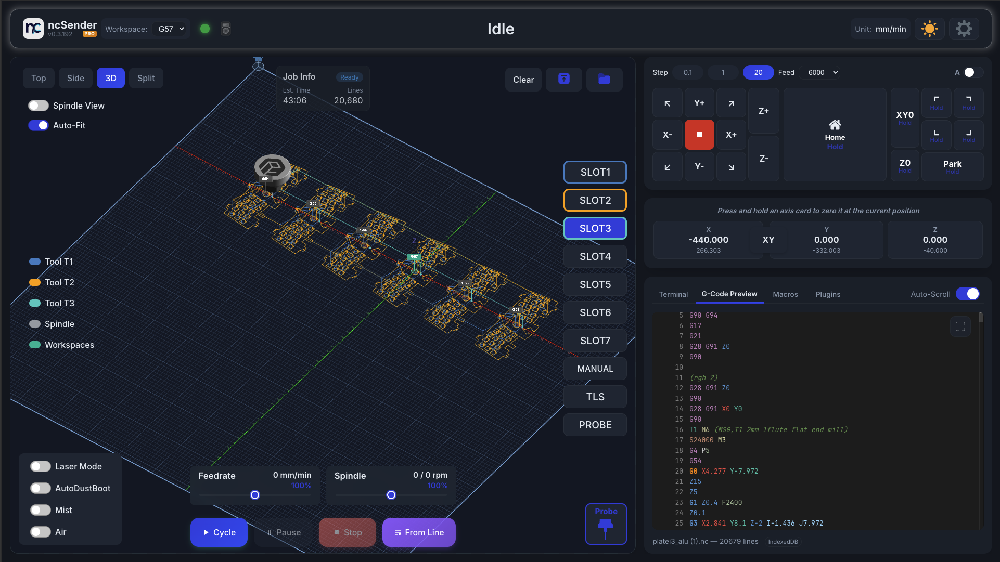
ncSender is the control software for your grblHAL machine — 3D visualiser, jogging, probing, tool library and plugins in one app. The Community edition is free and open source. This is the Pro licence that unlocks the rest of it, in the same application you already run.
Pro features
Everything in Community stays exactly as it is. Pro adds the parts aimed at rotary work, lasers, and running the machine from ncSenderOS on a Raspberry Pi 5 at the machine itself.
| Community | Pro | |
|---|---|---|
| Price | Free | $79.00 once |
| Visualiser, jogging, probing, macros | Yes | Yes |
| Tool library | Yes | Yes |
| Plugins — RapidChange ATC, Edge Align, 3DMesh, QuickCut and more | Yes | Yes |
| Pendant support, wired and wireless | Yes | Yes |
| 4th axis and laser mode | — | Yes |
| Multi-workspace | — | Yes |
| Safety Door Intelligence and Trace | — | Yes |
| Keepout zones | — | Yes |
| Vectric tool library import | — | Yes |
| ncSenderOS Pi 5 kiosk image, and the virtual keyboard | — | Yes |
| Languages | English | English, Deutsch, Français, Español |
| In-app updates | — | Yes |
After you buy
You do not download a different application. Install ncSender, then activate the copy you already have.
Before you buy
ncSender has its own site and documentation, kept up to date with each release — screenshots, every feature in detail, plugin guides and controller setup. Worth a look before you spend anything: run the free Community edition first and buy the licence only if you need what Pro adds.
Windows 10 or later (x64), macOS 12 Monterey or later on Apple Silicon or Intel, and Ubuntu 22.04+ or Debian 12+ on x64 or ARM64. There is also a prebuilt Raspberry Pi 5 image, which is a Pro feature.
grblHAL over USB or Ethernet, and FluidNC. Setup for both is covered in the documentation.
Only if you want what is in the table above — rotary or laser work, multi-workspace, keepout zones, in-app updates, or ncSenderOS, the ready-to-boot Raspberry Pi 5 image that starts straight into ncSender in kiosk mode. For ordinary routing the free Community edition is the same program with the same visualiser, probing and tool library.
Yes. Deactivate it under Settings → Manage License on the old computer, then activate on the new one with the same Installation ID.
Ongoing updates are free, and stay free. The licence is a one-time purchase, Pro updates itself in place on Windows, macOS and Linux, and every release after it - new features, improvements and fixes - is included at no extra cost. Only a future major version would ever carry an upgrade fee; none is planned, and it would not change the licence you already hold.
No reviews yet.